

What happens to a device’s asset history when it leaves the office for repair? A phone may move between users or departments, and its label or serial number can be missed at handover. That can make it harder to track repair status and decide whether to repair or replace the device. For asset-tagged device repair for organisations, keep the asset ID connected to the device and its internal record.
We know downtime matters, but so does choosing a repair route that fits the device and your workflow. In this guide, we explain how to organise a clear handover, keep identifiers linked to your records and request a suitable repair quote. We provide technology repair and accessories, with our FREE Mail-In Device Repair Service available nationwide across Ireland.
Key Takeaways
- Keep your organisation’s asset register separate from the repair process, and use the asset ID to connect the device with your internal records.
- For asset-tagged device repair for organisations, identify the device and fault, assess its operational need, then request a quote for a suitable repair.
- At handover, record the asset ID and fault, and follow your organisation’s own data-handling process.
- Organisations across Ireland can use our FREE Mail-In Device Repair Service for nationwide access to technology repair.
Asset-tagged device repair for organisations: keep the asset record connected
An asset tag links a device to an identifier in your organisation’s register. That record may show who uses the device, where it belongs and its maintenance history. A repair addresses a fault, but your organisation remains responsible for maintaining and updating its asset register. Use the same identifier when logging the repair request and updating the device’s status.
Clear records are especially useful when devices move between people or departments. If a laptop is sent for charging-port repair, for example, the fault description alone may not tell colleagues which laptop is away or who needs an update. Linking the asset ID, reported fault and handover status helps your team follow the repair and match the returned device to the right internal record. That is the practical basis of asset-tagged device repair for organisations.
What should an organisation track when a tagged device needs repair?
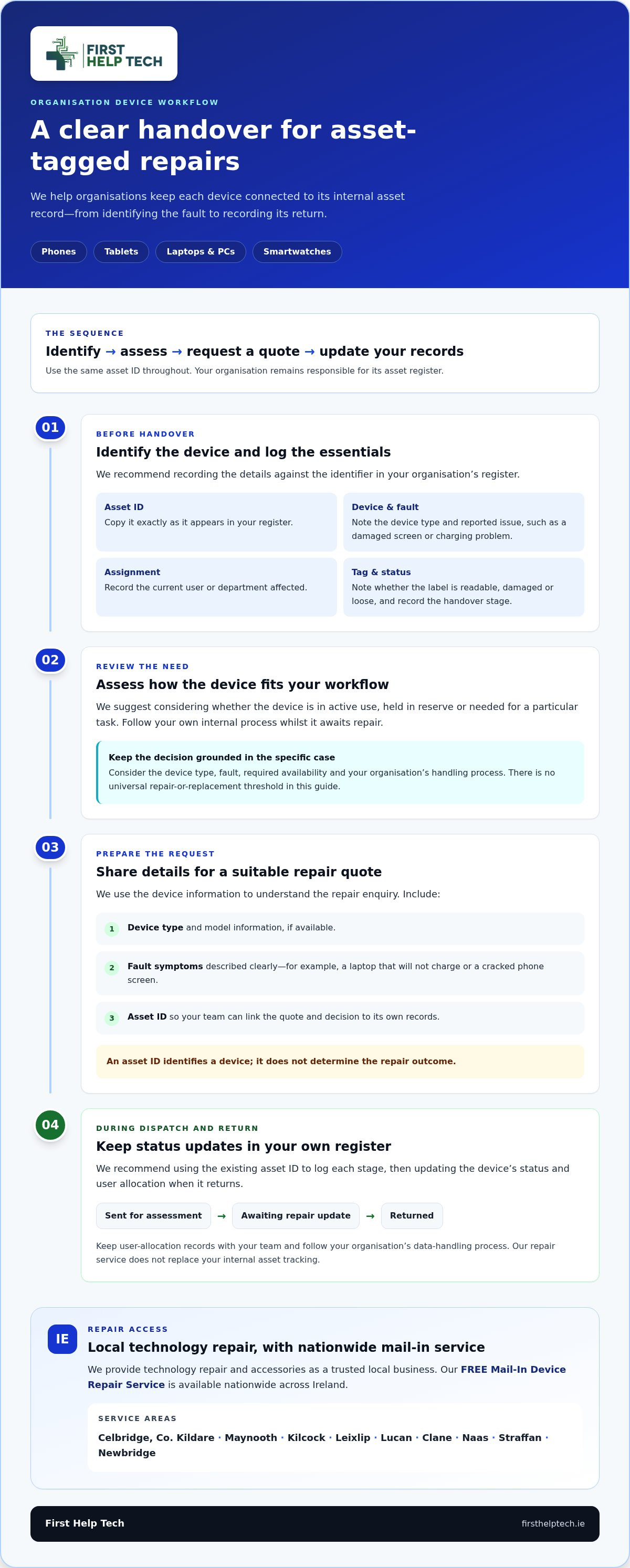
Before handover, create or update a record with the essential details. We repair phones, tablets, laptops, PCs and smartwatches, so stating the device type helps make your request clear. Keep your organisation’s record separate from the repair process, and update it as the device moves through your workflow.
- Asset ID: Record the identifier exactly as it appears in your register.
- Device and fault: Note the device type and describe the reported issue, such as a damaged screen or charging problem.
- Current assignment: Add the current user or department so your team can identify who is affected.
- Tag condition and status: Note whether the label is readable, damaged or loose. Record the handover stage too, such as sent for assessment or returned.
These details create a useful record without assuming that the repair process includes asset tracking or that a tag will remain unchanged. We provide technology repair, while your team keeps its register aligned with each handover and return.
How to choose a repair route for an organisation’s tagged devices
Use a clear sequence: identify the device and fault, assess its operational need, then request a repair quote. This keeps the decision grounded in what the device does and how your team uses it, rather than relying on a fixed repair-versus-replacement rule. For asset-tagged device repair for organisations, the asset ID helps connect the quote and decision to your own records.
- Identify: Note the device type, model information if available, symptoms and asset ID.
- Assess: Consider whether the device is in active use, held in reserve or needed for a particular task. Follow your internal process for devices awaiting repair.
- Request: Share the relevant details so we can provide a repair quote for the appropriate device category.
Match the request to the hardware: phones, tablets, laptops, PCs or smartwatches. A laptop that will not charge, for example, has a different reported fault from a cracked phone screen, even if both devices are needed by their users. Our laptop repair service covers laptop repair enquiries. Assess each case by device type, fault, required availability and your organisation’s handling process. A quote gives you information to support your decision, but it does not establish a universal threshold for repair or replacement.
Which details help with a repair quote?
Include the device type, model information if available, fault symptoms and asset ID. The ID helps your team keep its register connected to the request, but it does not determine whether a repair is suitable. An asset ID identifies a device, not its repair outcome.
Keep the decision visible in your records
Record the device’s status against its existing asset ID, for example in use, held in reserve or awaiting repair. This makes it easier to review availability alongside the quote. If you’re ready to discuss a device fault, request a repair quote from our team.
Arrange asset-tagged device repair with a clear handover process
A consistent handover helps your team follow a device from dispatch to return without losing its place in your asset records. Before arranging technology repair, record the asset ID, describe the fault and follow your organisation’s data-handling process. Keep user-allocation records with your team, and make sure the person coordinating the repair knows how to update them.
What happens between booking a repair and updating the asset register?
Use the existing asset ID to log each step, such as dispatched, awaiting a repair update and returned. When the device comes back, your team can update its status and user allocation in your own register. This keeps repair progress and ownership details together internally, without relying on the repair service to manage your assets.
For asset-tagged device repair for organisations, one internal contact or an agreed workflow can make handovers easier. That person can record dispatch and return, pass on repair updates and keep relevant colleagues informed. Our FREE Mail-In Device Repair Service gives organisations across Ireland a way to arrange repairs by post.
Organisations can book online or request a repair quote online. We have provided repair services since 2016, and our support is quick and friendly. We are also rated 4.9/5 on Google Reviews, a customer rating that does not imply Google endorsement. Once you have recorded the device details and chosen an internal handover contact, use our online booking or quote request to get the repair process under way.
Make your next repair handover easier
Turn your repair process into a routine your team can follow whenever a device needs attention. A consistent internal contact and a shared record help colleagues see who is coordinating the handover, where the device is in the process and when its status needs updating. Over time, this makes asset-tagged device repair for organisations easier to manage across users and departments.
We’re here to help with technology repair for your organisation’s devices. Book a repair or request a quote to discuss the fault and next steps. Our FREE Mail-In Device Repair Service is available nationwide across Ireland.
Start with one device, keep its identifier connected to your internal record, and build a handover process that works for your organisation.
Frequently Asked Questions
Is asset tagging the same as device management?
No. An asset tag is an identifier that connects a physical device to your organisation’s records. Device management is broader and covers how hardware, users and workflows are handled. For example, your internal process may manage who receives a device, while a repair service addresses a fault. Keep responsibility for your asset register and user allocations within your organisation.
Can an organisation repair an asset-tagged device without changing its asset ID?
Yes. The asset ID belongs to your organisation’s record, so keep it documented during the repair. Before handover, note the label’s condition and consider recording other device identifiers, such as its model or serial number, alongside it. If work affects the area where the label is attached, do not assume the physical tag will remain unchanged.
What should an organisation do if an asset tag is damaged or unreadable?
Record the damaged tag in your internal register, along with other available details such as the device type, model or serial number. Keep this note linked to the device’s repair status and user allocation. When the device returns, your team can reconcile the record and follow its usual process for resolving missing or unreadable identifiers.
Can organisations send tagged phones, tablets and laptops for repair by post?
Yes. Our FREE Mail-In Device Repair Service is available nationwide across Ireland. For asset-tagged device repair for organisations, use our online booking or quote route for phones, tablets and laptops. Before sending a device, keep its asset ID and fault details in your own workflow so your team can maintain a clear internal record.