

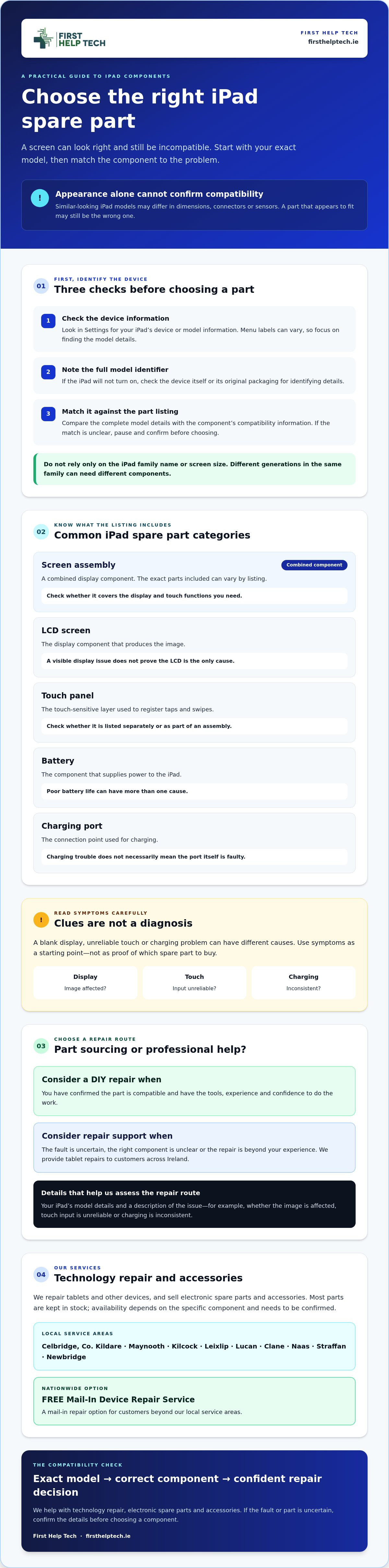
What looks like the right iPad screen can still be the wrong part. Connectors, sensors and dimensions can differ between models, even when screens look alike.
Choosing ipad spares starts with identifying your exact iPad model and matching the component to it. If you’re unsure which iPad you own, or whether you need glass, a touch panel or a full display assembly, check before ordering. This guide explains how to identify your iPad, compare common spare part categories and decide whether to source a part or arrange a repair.
First Help Tech repairs tablets and sells electronic spare parts and accessories. If you’d prefer professional help, you can book a repair or request a quote online.
Key Takeaways
- Check your iPad’s model details before choosing a component. Appearance alone can’t confirm compatibility.
- Understand the differences between screen assemblies, LCD screens, touch panels, batteries and charging ports.
- Use your iPad’s symptoms as a starting point, not a diagnosis, when considering ipad spares.
- First Help Tech offers tablet repairs and sells electronic spare parts and accessories. You can book a repair or request a quote online.
IPad Spares: Identify Your Model Before Choosing a Part
Confirm the exact iPad model before selecting a replacement component. Choosing ipad spares by appearance, family name or screen size alone can lead to an incompatible part.
Similar-looking iPad models may use different dimensions, connectors or sensors. A component that appears to fit may not be compatible.
How can you check which iPad model you have?
Use these checks before browsing parts:
- 1. Check the device settings. Open Settings and look for the iPad’s device or model information. Menu labels can vary, so focus on finding the model details rather than relying on a particular menu path.
- 2. Find the model identifier. Note the model number shown in the device information. If the iPad won’t turn on, check the device itself or its original packaging for identifying details.
- 3. Match the identifier to the part listing. Compare the full model details with the compatibility information for the component. If the listing doesn’t clearly match, pause and confirm before ordering.
Don’t rely only on a name such as iPad, iPad Air or iPad mini, or on screen size. Different generations within the same family can require different components. Check the complete model identifier against the part listing, and keep the details to hand while comparing available parts.
If you’re unsure how to interpret the model information or what repair may be needed, First Help Tech provides tablet repairs. You can book a repair or request a quote online.
Choose iPad Replacement Parts by Component and Repair Confidence
Once you’ve identified your model, narrow down the component. Part names can overlap, especially for screens, so check what each listing includes and match it to your iPad before choosing ipad spares.
| Part category | What it refers to | What to check |
|---|---|---|
| Screen assembly | A combined display component. The exact parts included can vary by listing. | Check whether the listing covers the display and touch functions you need. |
| LCD screen | The display component that produces the image. | A visible display issue doesn’t confirm the LCD is the only cause. |
| Touch panel | The touch-sensitive layer used to register taps and swipes. | Check whether it’s listed separately or as part of an assembly. |
| Battery | The component that supplies power to the iPad. | Poor battery life can have more than one cause. |
| Charging port | The connection point used for charging. | Charging trouble may not mean the port itself is faulty. |
Symptoms are clues, not a diagnosis. A blank display, unresponsive touch or charging problem can have different causes. Don’t select a part based on appearance or symptoms alone.
Should you buy an iPad spare part or request a repair?
Consider a DIY repair only if you’ve confirmed compatibility and have the tools, experience and confidence to do the work. If the fault is uncertain or the repair is beyond your experience, First Help Tech can help through its tablet repair service. The service is available to customers across Ireland.
If you’d like help deciding, you can request an iPad repair quote online.
Find iPad Spares in Ireland or Arrange a Repair with First Help Tech
Before choosing ipad spares, confirm your iPad’s exact model, identify the component and decide whether to source a part or request repair help. If the fault is uncertain, request a quote before ordering so you can consider the repair route.
First Help Tech provides tablet repairs and sells electronic spare parts and accessories to customers across Ireland. You can book a repair or request a quote online. Most parts are kept in stock, although availability depends on the specific component.
What is the next step if you are unsure about the right iPad part?
Share your iPad’s model details and describe the issue when requesting a quote. For example, note whether the display image is affected, touch input is unreliable or charging is inconsistent. This information can help the team consider the repair route, but the right component and its availability need to be confirmed.
If you’re considering a repair, explore the tablet repair service. When comparing spare parts, check that the listing specifies compatibility with your exact iPad model and explains which components are included.
Ready to discuss your iPad? Book a repair or request a quote and include your model details and the problem you’re experiencing.
Choose Your Next Step with Confidence
The right ipad spares start with the exact model, followed by a component that matches the issue. If the fault isn’t clear or the repair feels beyond your experience, professional help is a sensible option.
First Help Tech repairs tablets and other devices and sells spare parts and accessories. Most parts are kept in stock, but availability depends on the specific component, so check before making plans. The company serves customers across Ireland.
Share your iPad model details and the problem you’re experiencing to discuss a suitable repair route. Book a repair or request a quote.
Frequently Asked Questions
How do I find the correct spare parts for my iPad?
Start by finding the exact iPad model details, including its model identifier, then compare them with the compatibility information in the part listing. Confirm whether you need a screen assembly, LCD, touch panel, battery or charging-port component. Don’t rely on the iPad family name or a part’s appearance alone. If you can’t verify compatibility, ask about a tablet repair before ordering.
Can I replace an iPad screen or battery myself?
Whether you should replace an iPad screen or battery yourself depends on your repair experience, available tools and confidence. First, confirm the exact model and the specific component the listing covers. If you’re unsure about the fault or the work, don’t guess at a part or repair. First Help Tech provides tablet repairs, and you can request a quote before deciding.
What is the difference between an iPad LCD screen and a touch panel?
An LCD screen and a touch panel are different component categories: the LCD displays the image, while the touch panel registers taps and swipes. Which part is appropriate depends on your iPad model and the fault. Symptoms alone can’t confirm which component has failed. Check the listing’s compatibility and included parts, or ask about a repair if the category isn’t clear.
Can I arrange an iPad repair if I live elsewhere in Ireland?
Yes. First Help Tech serves customers nationally across Ireland. You can request a quote or book a repair online, including if you live outside the area around the business. Share your iPad model and describe the issue so the team can advise on the next step. A specific turnaround time cannot be promised.