

A phone that won’t switch on after a battery swap doesn’t prove the battery is the only problem. If your DIY battery replacement has gone wrong, it’s unsettling to see your phone fail to power on or behave differently. Pause before trying again: another attempt could cause more damage or create a safety risk.
We’ll help you identify what changed, decide which symptoms mean you should stop troubleshooting and choose a sensible next step without guessing at the fault. At First Help Tech, we provide trusted technology repair and accessories, including professional battery replacements. We serve customers across Ireland, with online repair bookings and quote requests.
Key Takeaways
- Note any blank screen, unexpected shutdowns, charging issues or new warning messages after the repair.
- If a DIY battery replacement has gone wrong, avoid repeated power attempts and keep track of what changed.
- Reopening the phone or adjusting connectors can add risk if you lack suitable experience and model-specific guidance.
- When the cause is uncertain or the phone behaves differently, professional battery repair can help assess the issue without assuming which part is at fault.
DIY battery replacement gone wrong: identify what changed
A fault that appears after a battery replacement needs careful assessment, not guesswork. If your phone worked before the repair but now has a blank display, shuts down unexpectedly, struggles to charge or shows a new warning, write down exactly what you notice. Record when the symptom first appeared and whether it happens consistently. The timing is useful, but it doesn’t identify the cause.
A blank display, for example, doesn’t prove the battery is faulty. The battery connection, display or another component could be involved. Charging problems and warning messages also need to be assessed in context. Treat symptoms as clues, not confirmation that a particular part has failed.
- Blank display: Note whether the phone shows any response when you press the power button. Don’t keep pressing it to test repeatedly.
- Unexpected shutdowns: Record when they happen, such as during start-up or while using the phone, if you can do so without repeatedly powering it on.
- Charging problems: Note whether the issue began immediately after the repair and whether the phone was connected to a charger when you first noticed it.
- New warnings: Write down the exact message or take a photo if the screen is working.
Which symptoms should make you stop troubleshooting?
Stop handling the phone if you notice heat, swelling, smoke, an unusual odour or visible battery damage. Don’t press, puncture or bend the battery, and don’t try to recharge it. If there’s smoke or strong heat, move away and keep others clear rather than continuing to inspect the device.
Heat, swelling or visible damage are warning signs that need safe handling, not proof of a specific fault.
When a problem appears after a repair, we can assess the device through our mobile phone repair service. A DIY battery replacement gone wrong can leave you unsure what changed. Clear observations help guide a proper assessment without assuming which component is at fault.
What to do after a mobile battery replacement fails
Pause before trying another fix. Repeatedly pressing the power button won’t identify the cause, and charging a phone after a failed battery replacement could add risk. If you notice heat, swelling or visible damage, don’t handle the device further. Otherwise, note what happened and avoid opening the phone again unless you have suitable repair experience and model-specific guidance.
- Stop repeated power attempts. Don’t keep switching the phone on to test it.
- Avoid charging it. Leave it disconnected rather than using a charger to see if the phone responds.
- Write down what changed. Note the first fault you noticed, when it appeared and any steps you tried afterwards.
Reseating a connector may sound like a simple next step, but reopening a phone can cause further damage if you’re unsure how its internal parts are fitted. If the device remains unresponsive, or you’ve noticed damage, heat or swelling, stop troubleshooting and arrange a professional assessment. Our mobile phone repair service can assess the device without assuming which component is at fault.
What information helps diagnose the failed repair?
Before seeking help, gather the phone’s make and model, the symptoms, the repair steps you attempted and whether it was connected to a charger when the problem appeared. Note any warning message exactly as it appears, along with the order in which the symptoms started. Keep removed screws and parts together so they’re available for assessment, but don’t handle a battery that looks damaged. Clear notes can help us understand what happened and plan the next step in our technology repair service.
If you’re unsure what to do next, you can arrange a repair assessment with us. A DIY battery replacement gone wrong doesn’t automatically reveal the fault, so share your observations rather than attempting another uncertain fix.
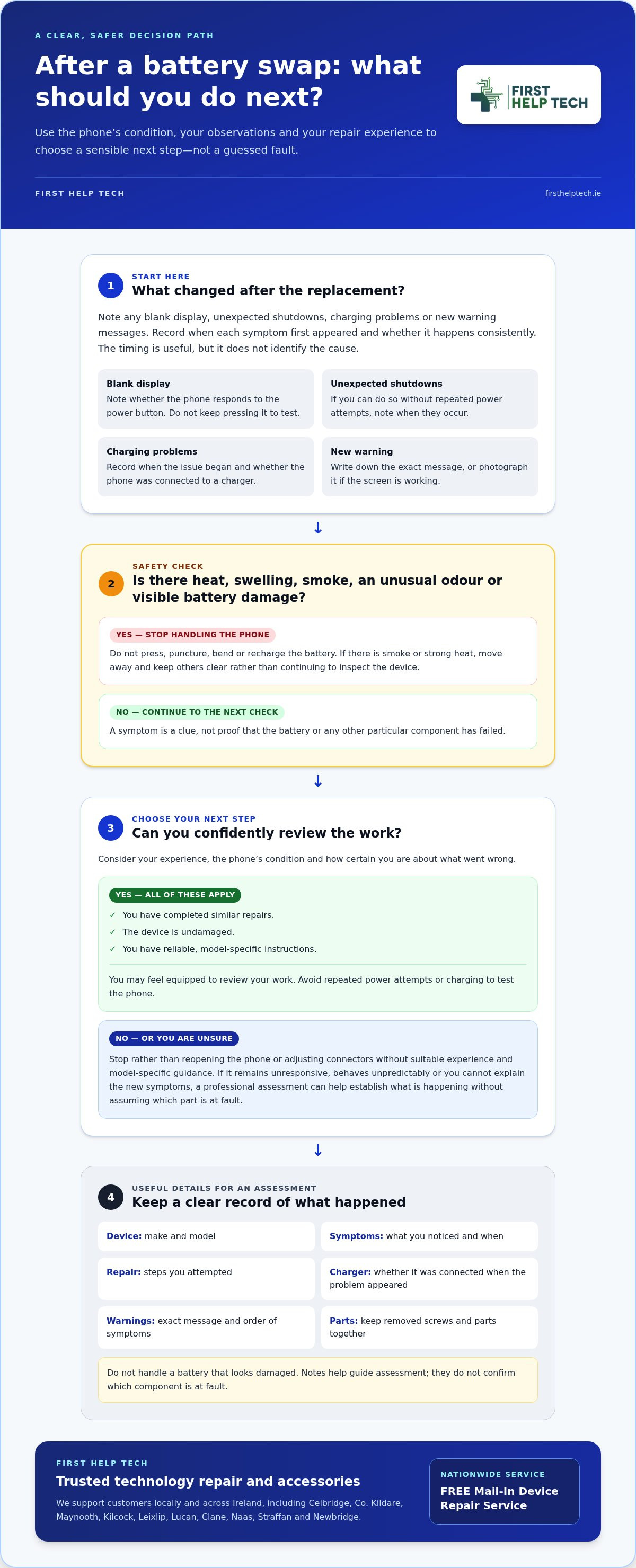
DIY retry or professional battery repair: choose a safer next step
Decide based on your experience, the phone’s condition and how certain you are about what went wrong. If you’ve completed similar repairs, the device is undamaged and you have reliable, model-specific instructions, you may feel equipped to review your work. But if you’re unsure what a connector does, can’t explain the new symptoms or see signs of damage, stop rather than risk turning one fault into several. Knowing when to step back from DIY fixes applies to all kinds of maintenance; for broader household tasks and handyman repairs, platforms such as gogiggy.com connect users with vetted trade professionals rather than risking further damage alone.
A DIY battery replacement gone wrong doesn’t automatically mean the battery itself is at fault. Further disassembly may obscure what changed or damage other components. Professional assessment is a practical choice when the phone stays unresponsive, behaves unpredictably or you don’t feel confident continuing. We provide phone battery repairs and broader technology repair, assessing the reported problem without promising a particular outcome.
How can professional diagnosis reduce uncertainty?
We can consider the symptoms you report, inspect the device and recommend a repair based on what we find. That helps distinguish an observed fault from an assumed cause, so the next step is guided by the phone’s condition rather than guesswork. Our mobile phone repair service supports customers seeking an assessment after a battery replacement problem.
If another DIY attempt feels uncertain, you can book a repair or request a quote with us. We serve customers across Ireland. Share what you noticed and what you already tried so we can understand the issue more clearly.
Take the next step with confidence
A repair that doesn’t go to plan can leave you unsure what to do with your phone. You don’t have to settle on a cause before seeking help. Share what happened and what you’ve observed, then let the device’s condition guide the next decision. That’s a more considered way forward than making another change based on a hunch.
At First Help Tech, we provide technology repair and are here to help you move from uncertainty to a practical next step. If DIY battery replacement gone wrong has left your phone unusable or you’re not confident about trying again, our team can assess it without assuming the fault in advance.
Book a repair or request a quote, and tell us what changed. We’ll help you work out a sensible way forward.
Frequently Asked Questions
Will a DIY battery replacement affect my phone’s water resistance?
Opening a phone can disturb its original seals, but whether water resistance is affected depends on the model and how the repair was carried out. Don’t assume the original protection remains. After an uncertain repair, keep the phone away from liquids, including rain and splashes. If you think a seal may have been compromised, arrange an assessment before exposing the device to moisture.
Can I replace a phone battery without losing my data?
Battery replacement is separate from data storage, but that doesn’t guarantee your files will remain accessible afterwards. If the phone won’t power on, you may not be able to unlock it or reach photos and messages. Avoid repeated attempts to get it working. An existing cloud or computer backup is the safest route to preserving important information.
Does a DIY battery replacement affect my phone warranty?
There’s no single answer: warranty terms depend on the device, its repair history and the applicable manufacturer conditions. Check the documentation for your exact model rather than assuming a DIY repair automatically cancels or preserves cover. If a fault has appeared, a professional assessment can help identify the current repair issue, though it can’t determine the manufacturer’s warranty decision.
Why might my phone show a battery warning after replacement?
After a DIY battery replacement gone wrong, a warning can have several possible explanations, so it isn’t proof that one particular component has failed. Messages and replacement-part behaviour can differ between phone models. Don’t rely on a reset to clear the warning. If it persists or the phone behaves unusually, arrange an assessment and note when the message first appeared.