

What if a part listed for a similar Galaxy model doesn’t fit your phone? Samsung Service Pack parts can look alike across devices, but choosing by name alone risks ordering the wrong battery or screen assembly. Start with your exact model number, then check the component type and part identifier in the listing.
We know that part numbers and descriptions can be difficult to interpret. In this guide, we’ll show you how to match a Samsung part to your device, compare battery and complete display assembly options, and make a more confident choice. If you’d rather leave the repair to us, we provide mobile phone repairs, including screen and battery replacements.
Key Takeaways
- Record your Galaxy’s full model code before browsing samsung service pack parts; a shared family name alone doesn’t prove a part will fit.
- Choose the right component first: battery listings and complete screen assemblies are intended for different repairs.
- Compare the model code and component identifier in each listing. Battery capacity can help you compare options, but it doesn’t confirm compatibility on its own.
- Explore examples for Galaxy S22 5G, S24 Ultra, Note 20 Ultra, A02s, A22 and S25, or choose professional repair if you’d rather not fit a part yourself.
Samsung Service Pack parts: identify your exact Galaxy model first
Before browsing samsung service pack parts, record your phone’s full model code. On the device, open Settings and look under About phone. You can also check the label on the phone’s packaging, if you still have it. Keep the complete code, including its letters and numbers, close by as you compare listings.
A Galaxy family name isn’t enough to establish compatibility. Phones within the same series can have different model codes, and a part listed for one variant may not match another. Match the listing’s full model code to your device before comparing component features. This simple step helps reduce the risk of ordering a part that won’t fit.
Where to find a Samsung model number and part identifier
Read the model code in your settings or from the packaging label, then compare it with the model details in the product listing. Don’t stop at a broad name such as “Galaxy S” or “Galaxy A”. Look for the complete model entry and make sure it matches your phone.
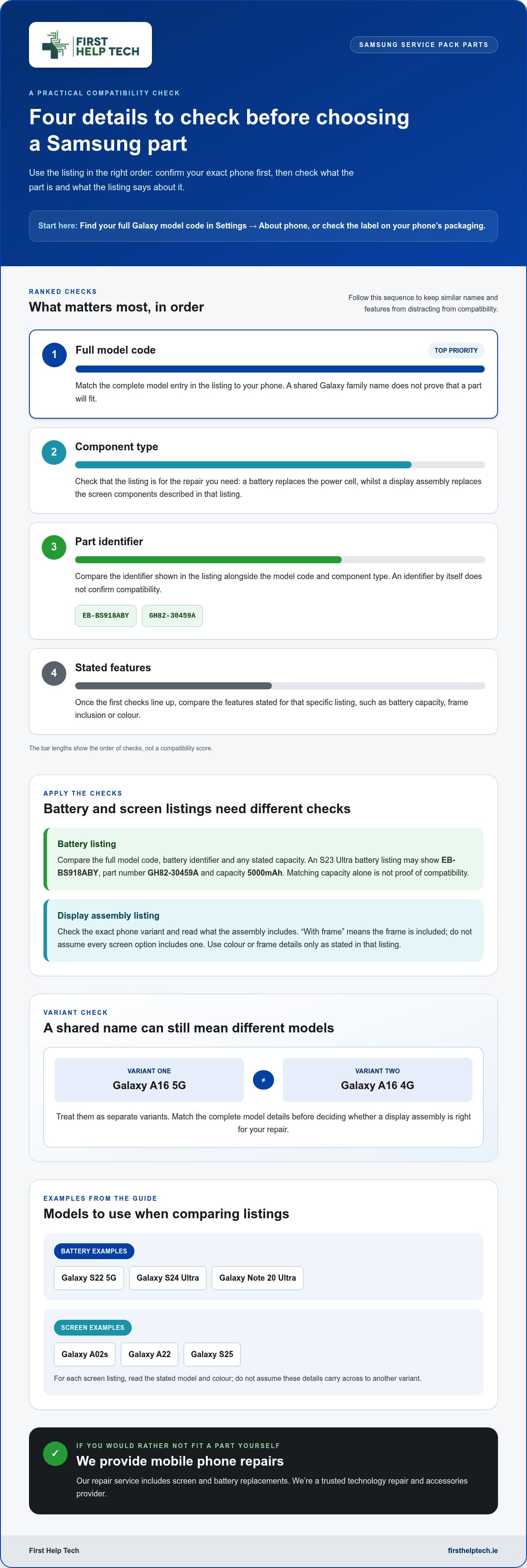
Listings may also show a component identifier, such as EB-BS918ABY or GH82-30459A. These codes help distinguish parts with similar descriptions. Use them alongside the model code and the stated component type; an identifier by itself doesn’t confirm that a part suits your device.
Once those details line up, you can compare the relevant battery or screen assembly with more confidence. If you’d rather not fit a replacement yourself, we provide mobile phone repairs, including screen and battery replacements.
Compare Samsung battery and screen Service Pack parts before buying
Once you’ve identified your Galaxy model, check that the listing matches both the device and the repair you need. Battery parts and display assemblies serve different purposes: a battery replaces the phone’s power cell, whilst a display assembly replaces the screen components described in that listing. Don’t choose by the word “Samsung” or a familiar series name alone.
Which listing details matter for batteries and display assemblies?
For a battery, compare the full model code, the battery identifier and any stated capacity. For example, an S23 Ultra battery listing may show EB-BS918ABY, part number GH82-30459A and a capacity of 5000mAh. Use these details together. A matching capacity isn’t proof of compatibility if the model code or battery identifier doesn’t match.
Screen listings need a different check. Look for the correct phone variant and read exactly what the assembly includes. A listing that says “with frame” indicates the frame is included; don’t assume that applies to every screen option. Colour or frame details are relevant only as stated in that specific listing.
Take the Galaxy A16 5G and Galaxy A16 4G as a useful comparison. They are separate variants, so don’t treat a display assembly listed for one as suitable for the other based on the shared A16 name. Match the complete model details in the listing before deciding whether its stated assembly is right for your repair.
Use this quick order: model code, component type, part identifier, then stated features. That makes it easier to compare samsung service pack parts without letting a similar name or capacity distract from compatibility. Browse our Samsung battery and screen parts collection with those details in hand.
Samsung Service Pack examples and your next step
Real listing examples help put model matching into practice. For batteries, compare options listed for the Galaxy S22 5G, Galaxy S24 Ultra and Galaxy Note 20 Ultra. Check the complete model details and battery identifier in each listing rather than choosing by the Galaxy name alone.
For screens, look at display assembly listings for the Galaxy A02s, Galaxy A22 and Galaxy S25. Read each title carefully, including its stated model and colour. These details apply to that specific listing, so don’t assume an assembly or colour option suits another variant.
Browse the collection or choose a repair route
Use those examples as a starting point, then match the listing to your own device before choosing. Our Samsung Service Pack parts collection brings together battery and screen options. Check the model, component type and any identifiers shown in the listing.
Prefer not to fit a part yourself? We provide mobile phone repairs, including screen and battery replacements. Our repair service is another route to professional technology repair. With the right model details in hand, it’s easier to choose a sensible next step.
Choose your Samsung part with confidence
Choose samsung service pack parts by matching your phone’s full model code, then check the component type and identifiers in the listing. A Galaxy family name or battery capacity alone isn’t enough to confirm a match. Read the details carefully before deciding between a battery replacement and a display assembly.
Our collection brings together Samsung battery replacements and display assemblies for Galaxy S, A and Note models. Browse our Samsung Service Pack parts collection and compare the listing details with your device. If you’d rather not fit a part yourself, we provide mobile phone repairs, including screen and battery replacements.
We’re a trusted technology repair and accessories provider, here to help you choose a suitable next step. Browse our Samsung Service Pack parts collection or book a mobile phone repair with us.
Frequently Asked Questions
How do I know which Samsung Service Pack part fits my phone?
Match the part listing to your phone’s complete model code, not just its Galaxy family name. Find the code under Settings and About phone, or check the packaging label. Then compare it with the model details and component identifier in the listing. For samsung service pack parts, confirm the model match before weighing up other features.
What is the difference between a Samsung battery part and a display assembly?
A battery part replaces the phone’s battery, whilst a display assembly is intended to replace the screen components stated in its listing. Some screen listings specify that the assembly includes a frame, so read the description rather than assuming every option does. Compare the correct model code and component type first; battery capacity or a familiar screen description alone doesn’t prove a match.
Can I use a Galaxy A16 5G screen on a Galaxy A16 4G?
Don’t assume an A16 5G screen assembly fits an A16 4G phone. The shared “A16” name doesn’t establish compatibility between the variants. Check your phone’s full model code, then choose a listing that explicitly matches that model and describes the screen assembly you need. Treat any stated colour or frame detail as applying only to that specific listing.
Can First Help Tech repair my Samsung phone if I do not want to fit the part myself?
Yes. We provide mobile phone repairs, including screen and battery replacements, so you can choose professional repair instead of fitting a part yourself. If you’re unsure which repair route suits your Samsung phone, book a repair with First Help Tech and we’ll help you take the next step.