

Could the wrong Samsung screen repair leave the real problem untouched? A cracked Galaxy display is easy to spot, but lines, flickering, black spots or touch issues can make it harder to identify what needs attention. Before choosing samsung screen repairs, find your exact Samsung model and compare it with the repair listing.
At First Help Tech, we provide Samsung screen replacements as part of our technology repair service. We serve customers throughout Ireland and offer online booking and quote requests. In this guide, we’ll explain how to match your device to the right repair listing, describe the symptoms you’re seeing and choose a practical next step. We also sell accessories for phones and tablets.
Key Takeaways
- Check your Samsung’s full model name and number in the device information before selecting a repair listing.
- Choose a repair by matching the exact model, not just the Galaxy range.
- Cracks, display lines and touch issues can indicate a screen problem, but symptoms alone do not confirm the cause.
- Once you’ve found the matching listing, you can book online or request a quote.
How to find the right Samsung screen repair for your exact model
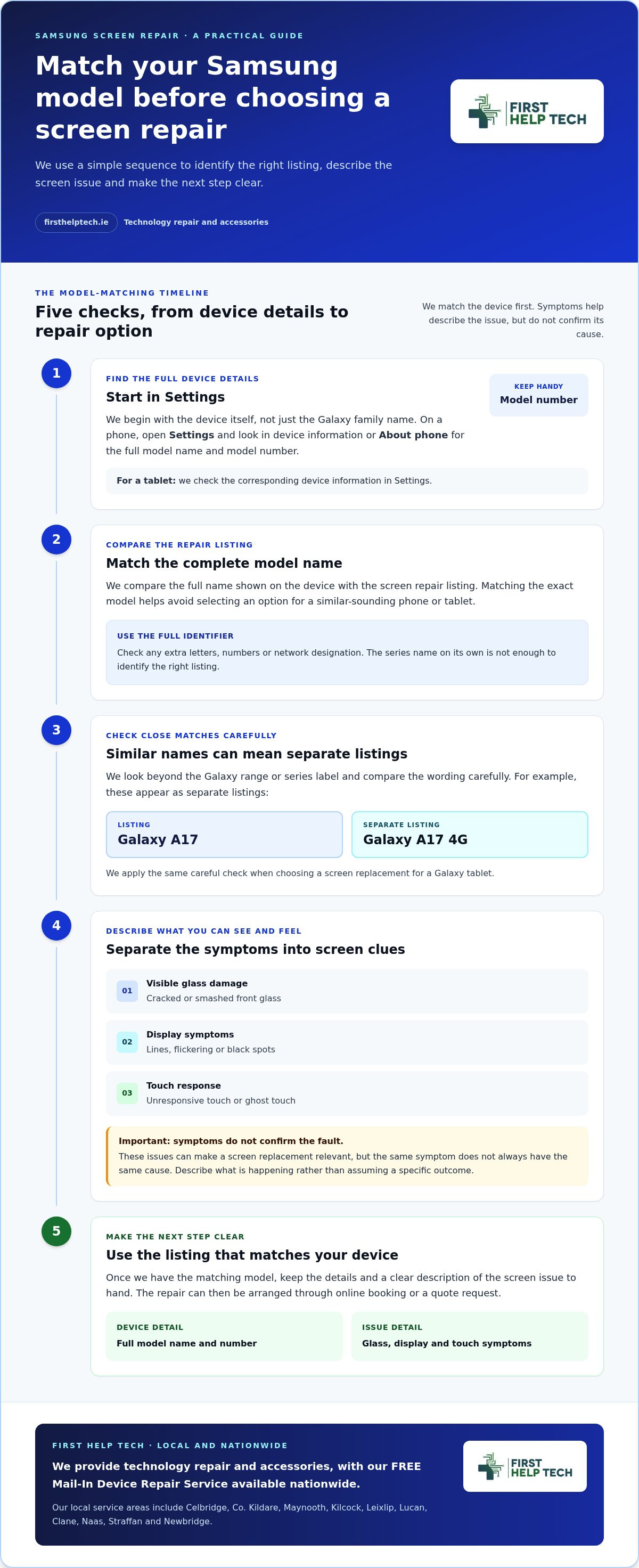
Start with the device itself, not just the Galaxy family name. On a phone, open Settings and look in the device information or “About phone” section for the full model name and model number. For a tablet, check the corresponding device information in Settings. Keep the model number handy, particularly if a repair listing looks familiar but the name is not an exact match.
Our Samsung screen repair listings cover selected Galaxy phones and tablets. Compare the full name shown on your device with the listing before choosing a repair. This helps you avoid selecting an option for a similar-sounding model. Browse our Samsung mobile repair options to find the relevant listing.
What if two Samsung model names look almost identical?
Use the complete model identifier rather than relying on the series name alone. For example, Galaxy A17 and Galaxy A17 4G appear as separate listings in our collection. Compare the wording carefully with your phone’s device information, including any extra letters, numbers or network designation. Apply the same check when choosing a screen replacement for a Galaxy tablet.
Once you’ve matched the model, you’ll have a clearer starting point for arranging the repair. We provide technology repair to customers throughout Ireland, with online booking and quote requests to help you take the next step. For readers located elsewhere in Europe, independent technicians such as A Plus Repair follow a similar model-specific approach to smartphone repairs.
Which Samsung screen problems can a screen replacement address?
Screen damage can appear in several ways. Cracked or smashed front glass is visible, but faults may also affect the display or how the screen responds. Lines, flickering or black spots can indicate a display problem, while unresponsive touch or ghost touch can make your phone difficult to use.
These symptoms can make a screen replacement a relevant repair option, but they do not all point to the same cause. Flickering or touch issues, for example, are not enough on their own to identify the fault. When considering Samsung screen repairs, describe what you’re seeing instead of assuming a particular symptom guarantees a specific outcome.
Does a cracked screen always mean the same repair?
No. A crack describes visible glass damage, while lines, black spots or touch problems describe display or response symptoms. They can appear together, but one does not automatically explain the others. Our screen replacement service addresses screen-related issues, though the appearance of the screen alone cannot reveal hidden damage. For other phone faults, explore our mobile phone repair service.
Symptoms help describe the problem, but they cannot identify the exact Samsung device. Choose a listing that matches your full model name, then compare its repair description with the issue you’re experiencing. Our Samsung screen repair options are organised by model. Customers across Ireland can book online or request a quote.
How to choose your Samsung repair and arrange the next step
Before booking, compare your device’s full model name with the Samsung screen repair listing. Don’t choose by series name alone, as a close match may refer to a different model. Once you’ve found the listing that matches your phone, use its repair option to book online or request a quote. Our technology repair service gives you a clear next step without having to diagnose the fault from symptoms alone.
What should you do before sending your Samsung device?
Have the model details ready and describe the screen issue clearly. Note whether the glass is cracked, the display shows lines or black spots, or touch is unresponsive or behaving unexpectedly. This gives us useful information when arranging the repair without assuming that a symptom confirms a particular fault. For Samsung tablet repairs, see our tablet repair service.
Keep your model information and a clear description of the problem to hand when arranging the repair. You can book online or request a quote, then follow the instructions provided for your chosen repair. Describing both the visible damage and any changes in display or touch response helps make the issue clear.
Ready to find the matching option? Browse our Samsung mobile repair options and select the listing that corresponds to your device.
Choose the right repair and take the next step
The key to suitable samsung screen repairs is matching the full model name to the repair listing, then considering the symptoms you’re experiencing. Cracked glass, display lines, black spots or touch issues can point to a screen problem, but symptoms alone do not confirm the cause.
At First Help Tech, we provide technology repairs to customers throughout Ireland and keep most repair parts in stock. You can book online or request a quote once you’ve found the listing that matches your device. We also sell phone and tablet accessories.
Ready to move forward? Browse Samsung screen repair options and select the listing that matches your device. We’re here to make finding the right repair straightforward.
Frequently Asked Questions
How do I find the exact model of my Samsung phone before choosing a screen repair?
Open Settings and look in the device information or “About phone” section for the full model name and model number. Use these details to match your phone to the repair listing, rather than relying on the Galaxy series name alone. Similar model names can refer to different devices, so compare the complete identifier before selecting an option.
Can a Samsung screen repair fix black spots, flickering or touch problems?
A screen replacement may address black spots, flickering, unresponsive touch or ghost touch. These symptoms can be screen-related, but they do not all have the same cause, so they cannot confirm on their own that a replacement will resolve the fault. Describe what you’re experiencing when arranging samsung screen repairs, and select the listing that matches your exact device.
Should I choose a screen repair if the glass is cracked but the display still works?
A screen replacement may be suitable for cracked or smashed front glass even if the display still works. Match your Samsung’s full model name to the repair listing, then describe the visible damage when booking or requesting a quote online. A working display does not show whether there is other damage, so avoid assuming more than the symptoms reveal.
Can I arrange a Samsung screen repair through the FREE Mail-In Device Repair Service?
Our repair service is available to customers throughout Ireland. Match your Samsung model to the relevant screen repair listing, then book online or request a quote and describe the screen problem. The screen repair itself is a separate service.