

What happens to your working day when your laptop fails just before a deadline? A frozen screen, a failing battery or a software issue can quickly turn remote work into a scramble, especially when you’re unsure what’s causing the fault or how to arrange a repair. Finding reliable laptop repairs for remote workforce Ireland means describing the problem clearly and choosing a practical next step.
At First Help Tech, we repair laptops and troubleshoot software issues, helping you understand the next steps for your device. In this guide, we’ll explain which issues suit a professional technology repair service, what details to gather before arranging an assessment, and how to book a repair or request a quote online. We’ll also cover how to plan for work disruption while your laptop is being assessed.
Key Takeaways
- Reliable laptop repairs for remote workforce Ireland start with a clear description of the fault and its effect on your work.
- Note when the problem began, what changed and any error messages to help explain the symptoms.
- Consider how the issue affects calls, deadlines and daily tasks when planning your repair.
- Our online booking and quote request options give you a straightforward way to get started with a laptop repair.
Reliable laptop repairs in Ireland: what remote workers need
A laptop fault can interrupt a client call, stall a deadline or make everyday remote work unexpectedly difficult. A reliable repair starts with understanding the symptoms and assessing whether they point to a hardware fault or a software problem. For remote workers, a clear description of the issue is especially useful: it helps us understand what the laptop is doing and how the fault affects your working day.
That’s what reliable laptop repairs for remote workforce Ireland should involve: relevant repair expertise and a clear route from describing the problem to arranging an assessment. At First Help Tech, we handle laptop hardware repairs and software troubleshooting. Our laptop repair service can address physical issues such as screen or battery faults, as well as software problems affecting how the device works.
Does the problem need laptop repair or software support?
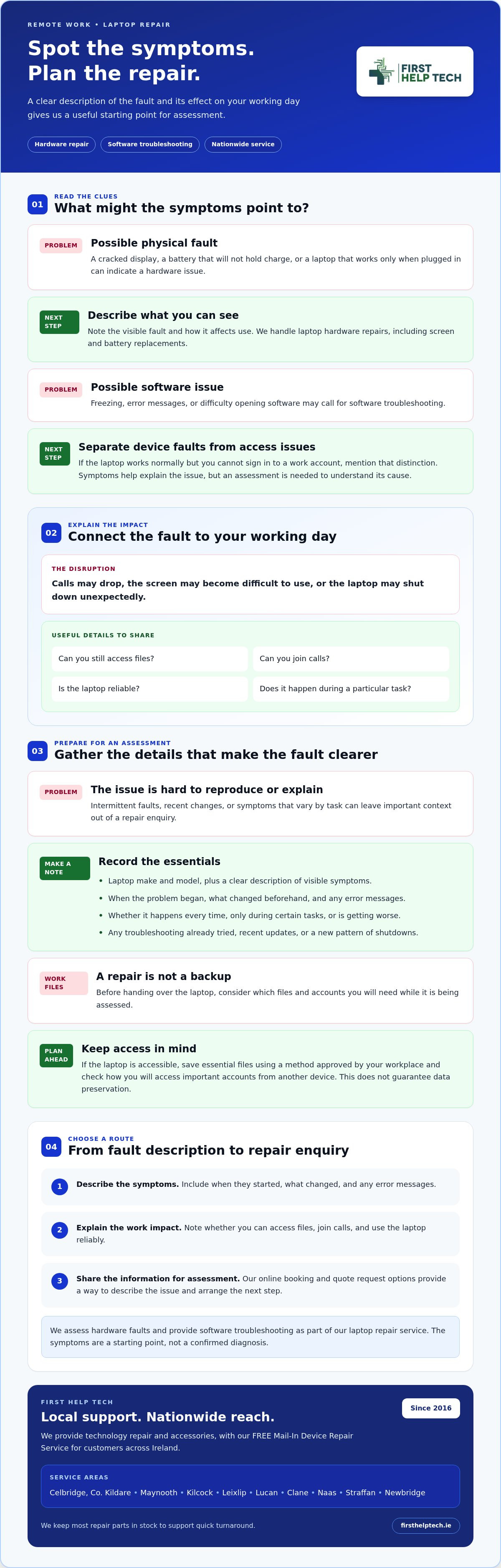
Start with what you can observe. A cracked display, a battery that won’t hold charge or a laptop that only works when plugged in may point to a physical fault. Freezing, error messages or trouble opening software may call for software troubleshooting. These symptoms help describe the issue, but they don’t confirm its cause. An assessment is needed to understand what’s happening.
Some account or access problems are separate from faults with the laptop itself. If the device is working normally but you can’t sign in to a work account, for example, note that distinction when describing the issue. We provide software troubleshooting as part of our laptop repair work, so sharing what you can and can’t do on the device helps us understand the problem.
Before arranging a repair, note when the problem began, what changed and any error messages you’ve seen. Include how it affects your work, such as calls dropping, the screen becoming difficult to use or the laptop shutting down unexpectedly. If the issue happens only during a particular task, mention that too. These details give us a clearer starting point for assessing the fault and considering the right repair route.
How to choose reliable laptop repairs for remote work
Choose a repair route by working through three questions: what is the laptop doing, how is it affecting your work, and what information will help explain the fault? This keeps the decision practical. A problem that prevents video calls may disrupt your day more than an issue that leaves essential tasks unaffected. For reliable laptop repairs for remote workforce Ireland, sharing the symptoms and their impact helps us understand what you need.
- Describe the symptoms. Note when the fault first appeared, what changed beforehand and any error messages. Mention whether it happens every time or only during certain tasks, and whether the problem is getting worse.
- Identify the work impact. Explain whether you can still access files, join calls or use the laptop reliably. This helps you plan around the device while arranging an assessment.
- Choose a repair route. Share the symptoms and work impact with us when arranging laptop repair. We assess hardware faults and provide software troubleshooting as part of our repair service.
What should you prepare before arranging a laptop repair?
Gather the laptop’s make and model, a clear description of visible symptoms, and a short note of any troubleshooting you’ve already tried. Include relevant changes, such as a recent update or a new pattern of shutdowns. If the issue comes and goes, explain when you last noticed it and what you were doing at the time.
Before handing over the device, consider which personal files and work accounts you’ll need. If the laptop is still accessible, save essential files using a method approved for your workplace, and check how you’ll access important accounts from another device. This preparation doesn’t guarantee data preservation, so don’t rely on the repair process as a backup.
Once you’ve gathered these details, you can book a laptop repair or request a quote with a clearer description of the issue.
First Help Tech laptop repairs: nationwide mail-in next steps
Remote workers across Ireland need a practical way to arrange laptop repair. At First Help Tech, we provide laptop repairs to customers nationwide, with online booking and quote requests to get the process started. As a trusted technology repair provider, we aim to make the next step clear, from describing the fault to arranging your repair.
We handle laptop hardware repairs and software troubleshooting, including screen and battery replacements. Our laptop repair service is a useful starting point for understanding the support your device may need. We also offer accessories for phones, tablets and other devices alongside our repair services.
Book a repair or request a quote
Once you’ve noted the laptop model, symptoms and effect on your work, use our online booking option or request a quote. Include any error messages and explain when the problem occurs. A clear description gives us a useful starting point for your repair enquiry and helps us understand what needs assessment.
Before arranging a repair for a work laptop, consider how you’ll access essential files and accounts while the device is being assessed. Keep any work-data requirements in mind as you plan, and save important files where possible. Ready to take the next step? Book a laptop repair or request a quote online, and tell us what’s happening with your device.
Keep your remote work moving with a clear repair plan
A laptop fault doesn’t have to leave you guessing about what to do next. Keep a note of the symptoms and how they affect your work, so you’re ready to arrange an assessment. Include when the issue started, whether it happens repeatedly and what you were doing at the time. For reliable laptop repairs for remote workforce Ireland, these practical details help you plan your next steps with confidence.
First Help Tech has supported customers since 2016. We keep most repair parts in stock to support quick turnaround, and we offer laptop repairs to customers across Ireland. Whether you’re arranging a repair or looking for a quote, we’re ready to help you move forward.
Book a laptop repair or request a quote and take the next step towards getting your work setup back on track.
Frequently Asked Questions
Can I get a laptop repaired without travelling to a repair shop in Ireland?
You can start arranging a laptop repair from anywhere in Ireland using our online booking or quote request options. Describe the laptop model, symptoms and how the fault affects your working day so we have a clear starting point for your enquiry.
How long does a laptop repair take?
Repair time depends on the fault and the work involved, so there isn’t one timeframe that applies to every laptop. We keep most repair parts in stock to support quick turnaround, although the time needed depends on the particular repair. Include a clear description of the fault in your booking or quote request to help us understand what needs attention.
Can laptop repair help with both hardware and software problems?
Yes, we provide laptop hardware repairs and software troubleshooting. A damaged screen or battery may need physical repair, while certain problems affecting how software runs may call for troubleshooting. The right approach depends on the symptoms and assessment. Tell us what you notice, including whether the issue happens consistently or only during particular tasks, when booking or requesting a quote.
What should I do before sending a laptop for repair?
Before arranging a repair, note the laptop’s make and model, describe the fault and record any troubleshooting you’ve tried. Consider how you’ll access essential work files and accounts while the device is being assessed. If you can access important data, keep copies where possible before handing over the laptop. Don’t assume personal or work files will be preserved during repair.